- unwind ai
- Posts
- How I Built an Autonomous AI Agent Team That Runs 24/7
How I Built an Autonomous AI Agent Team That Runs 24/7
Full step-by-step tutorial to make your own Agent Team with OpenClaw

Shubham Saboo
February 12, 2026
Six AI agents run my entire life while I sleep.
Not a demo. Not a weekend project.
A real team that works 24/7, making sure I'm never behind. Research done. Content drafted. Code reviewed. Newsletter ready. By the time I open Telegram in the morning, they've already put in a full shift.
Yesterday I posted about my agent team. The number one question: "How do I actually set this thing up?"
This is the answer. Not theory. Not architecture diagrams. The actual file structure I use, the actual costs I pay, the actual failures I hit. Everything.
By the end of this, you will understand exactly how to build an autonomous AI agent team that runs while you sleep.
Why A Team and Not A Tool
Running Unwind AI and the Awesome LLM Apps repo means doing six things daily. Research what's trending in AI. Write tweets. Write LinkedIn posts. Draft the newsletter. Review GitHub contributions on the repo. Triage community issues.
Each task: 30 to 60 minutes. Six tasks. That's my entire day gone before I do any real work.
I tried solving this with a single agent. One massive prompt that researches and writes and reviews. It produced mediocre everything. The context filled up. The quality degraded. One agent couldn't hold six different jobs in its head.
So I hired six AI Agents.
Meet The Squad
Every agent is named after a TV character. This is not a gimmick. When I tell Claude "you have Dwight Schrute energy," it already knows what that means from training data. Thorough, intense, takes the job dead seriously. That is 30 seasons of character development I get for free.
1. Monica (Chief of Staff): Named after Monica Geller. She is the main agent, the one I talk to the most on Telegram. She coordinates the others, handles strategic decisions, and delegates tasks to the right specialist. From her real SOUL.md: "You're the one who makes sure everything gets done right."
2. Dwight (Research): Named after Dwight Schrute. He runs research sweeps three times a day. Checks X, Hacker News, GitHub trending, Google AI blog, research papers. Writes structured intel reports that every other agent consumes.
3. Kelly (X/Twitter): Named after Kelly Kapoor. She reads Dwight's research and crafts tweet drafts in my voice. Single tweets, threads, quote tweets. From her real SOUL.md: "You know what's trending before it trends."
4. Rachel (LinkedIn). Named after Rachel Green. Same intel source as Kelly, different platform, different tone. Thought leadership angles instead of hot takes.
5. Ross (Engineering). Named after Ross Geller. Handles code reviews, bug fixes, technical implementations. From his real SOUL.md: "When you tackle a problem, understand it fully. Don't just fix the symptom."
6. Pam (Newsletter). Named after Pam Beesly. Turns Dwight's daily intel into a newsletter digest.
Six agents. One job each. No confusion about who does what.
NOW, The Setup
I run everything on a Mac Mini M4. But I need to be clear: you do not need a Mac Mini.
OpenClaw runs on macOS, Linux, and Windows (via WSL). A laptop works. A gaming PC works. A $5/month VPS works. The Mac Mini is convenient because it is always on, silent, and sips power. Not a requirement.
My setup: Mac Mini M4 base model. Always connected to power and internet. No monitor attached. I interact entirely through Telegram on my phone.
Installing OpenClaw
It's just two terminal commands and takes less than five minutes.
# 1. Install OpenClaw
curl -fsSL https://openclaw.ai/install.sh | bash

# 2. Onboard with Quickstart (simplest way)
openclaw onboard
Check out the Openclaw documentation if you get stuck.
This starts the gateway, the background process that keeps everything alive. It manages your agents, runs cron jobs, handles Telegram messages. Close your terminal. The agents keep working
Workspace structure
One OpenClaw instance. Multiple agents. Not six separate installations.
My actual directory structure:
workspace/
├── SOUL.md              # Monica (main agent, lives at root)
├── AGENTS.md            # Behavior rules for all sessions
├── MEMORY.md            # Monica's long-term memory
├── HEARTBEAT.md         # Self-healing cron monitor
├── agents/
│   ├── dwight/
│   │   ├── SOUL.md
│   │   ├── AGENTS.md
│   │   └── memory/
│   ├── kelly/
│   │   ├── SOUL.md
│   │   ├── AGENTS.md
│   │   └── memory/
│   ├── ross/
│   │   ├── SOUL.md
│   │   └── memory/
│   ├── rachel/
│   │   └── ...
│   └── pam/
│       └── ...
└── intel/
    ├── DAILY-INTEL.md       # Dwight's generated research
    └── data/
        └── 2026-02-11.json  # Structured data (source of truth)
Monica lives at the root. She is the main agent I talk to. The others are sub-agents she can delegate to, or they run independently on their own cron schedules.
You do not need six agents to start. I started with just Monica. Added the others over a few weeks as the workflow became clear.
What The Heck is a SOUL.md
Every agent is defined by one file: SOUL.md. This is the agent's identity, role, and operating instructions. It is the most important file in the entire system.
For example, this is what the SOUL file for Dwight looks like:
# SOUL.md (Dwight)

## Core Identity

**Dwight** — the research brain. Named after Dwight Schrute because
you share his intensity: thorough to a fault, knows EVERYTHING in
your domain, takes your job extremely seriously. No fluff. No
speculation. Just facts and sources.

## Your Role

You are the intelligence backbone of the squad. You research, verify,
organize, and deliver intel that other agents use to create content.

**You feed:**
- Kelly (X/Twitter) — viral trends, hot threads, breaking news
- Rachel (LinkedIn) — thought leadership angles, industry news

## Your Principles

### 1. NEVER Make Things Up
- Every claim has a source link
- Every metric is from the source, not estimated
- If uncertain, mark it [UNVERIFIED]
- "I don't know" is better than wrong

### 2. Signal Over Noise
- Not everything trending matters
- Prioritize: relevance to AI/agents, engagement velocity,
  source credibility
Notice what this file does. Not just 'you are a research agent.' It gives the agent a personality, clear principles, explicit relationships to other agents, and a decision framework.
Monica's SOUL.md:
# SOUL.md (Monica)

*You're the Chief of Staff. The operation runs through you.*

## Core Identity

**Monica** — organized, driven, slightly competitive. Named after
Monica Geller because you share her energy: caring but exacting,
supportive but with standards.

## Your Role

You're Shubham's Chief of Staff. That means:
- **Strategic oversight** — see the big picture, keep things moving
- **Delegation** — assign tasks to the right squad member
- **Direct support** — handle anything that doesn't fit a specialist
- **Coordination** — make sure the squad works together smoothly

## Operating Style

**Be genuinely helpful, not performatively helpful.** Skip the filler.

**Delegate when appropriate.** If it's clearly X content → Kelly.
If it's code → Ross. If it's ambiguous or strategic → you handle it.

**Have opinions.** You're allowed to push back, suggest better
approaches, flag concerns.
The pattern is consistent across all agents. Identity. Role. Principles. Relationships. Vibe. Each SOUL.md is about 40-60 lines. Short enough to fit in context every session. Detailed enough to produce consistent behavior.
Multi-agent coordination
No API calls between agents. No message queues. No orchestration framework.
Just files.
Dwight does research and writes findings to intel/DAILY-INTEL.md. Kelly wakes up, reads that file, drafts tweets from it. Rachel reads the same file, drafts LinkedIn posts. Pam reads it, writes the newsletter.
The coordination is the filesystem.
Dwight's SOUL.md tells him exactly where to write:
## Output Files

intel/
├── data/YYYY-MM-DD.json    ← Your structured data (source of truth)
└── DAILY-INTEL.md          ← Generated view (agents read this)
Kelly's AGENTS.md tells her exactly where to read:
## Intel-Powered Workflow

Dwight handles all research and writes to `intel/DAILY-INTEL.md`.

Your job: Read the intel → Craft X content → Deliver drafts
No middleware. No integration layer. Dwight writes a file. Kelly reads a file. The handoff is a markdown document on disk.
This sounds too simple. It is simple. That is why it works. Files do not crash. Files do not have authentication issues. Files do not need API rate limit handling. They are just there.
The structured data lives in JSON. The human-readable summaries live in markdown. Agents read the markdown. The JSON is the source of truth for deduplication and tracking over time.
The Memory System
Agents wake up with no memory of previous sessions. Every conversation starts fresh. This is a feature, not a bug. But it means memory must be explicit.
Two layers.
Daily logs (memory/YYYY-MM-DD.md): Raw notes from each session. What happened, what was drafted, what feedback came in. The agent writes these throughout the day.
Long-term memory (MEMORY.md): Curated insights distilled from daily logs. Lessons learned, preferences discovered, patterns noticed.
From the AGENTS.md that every agent follows at the start of every session:
## Memory

You wake up fresh each session. These files are your continuity:
- **Daily notes:** `memory/YYYY-MM-DD.md` — raw logs of what happened
- **Long-term:** `MEMORY.md` — curated memories

### Write It Down - No "Mental Notes"!
- Memory is limited. If you want to remember something,
  WRITE IT TO A FILE.
- "Mental notes" don't survive session restarts. Files do.
- When someone says "remember this" → update the memory file
- When you learn a lesson → update the relevant file
- Text > Brain
The agents actually get better over time. Not because the model improves. Because the context they load gets richer.
Kelly learned that my writing voice has no emojis and no hashtags. That is in her memory now. Every future draft reflects it without me saying it again. Dwight learned which types of stories pass the "Alex filter" (our target audience profile) and which ones to skip. That is in his memory too.
During heartbeats, agents periodically review their daily logs and distill the important stuff into MEMORY.md. Daily files are raw notes.
MEMORY.md is curated wisdom.
Scheduling
Agents need to wake up on their own. OpenClaw handles this with built-in cron scheduling
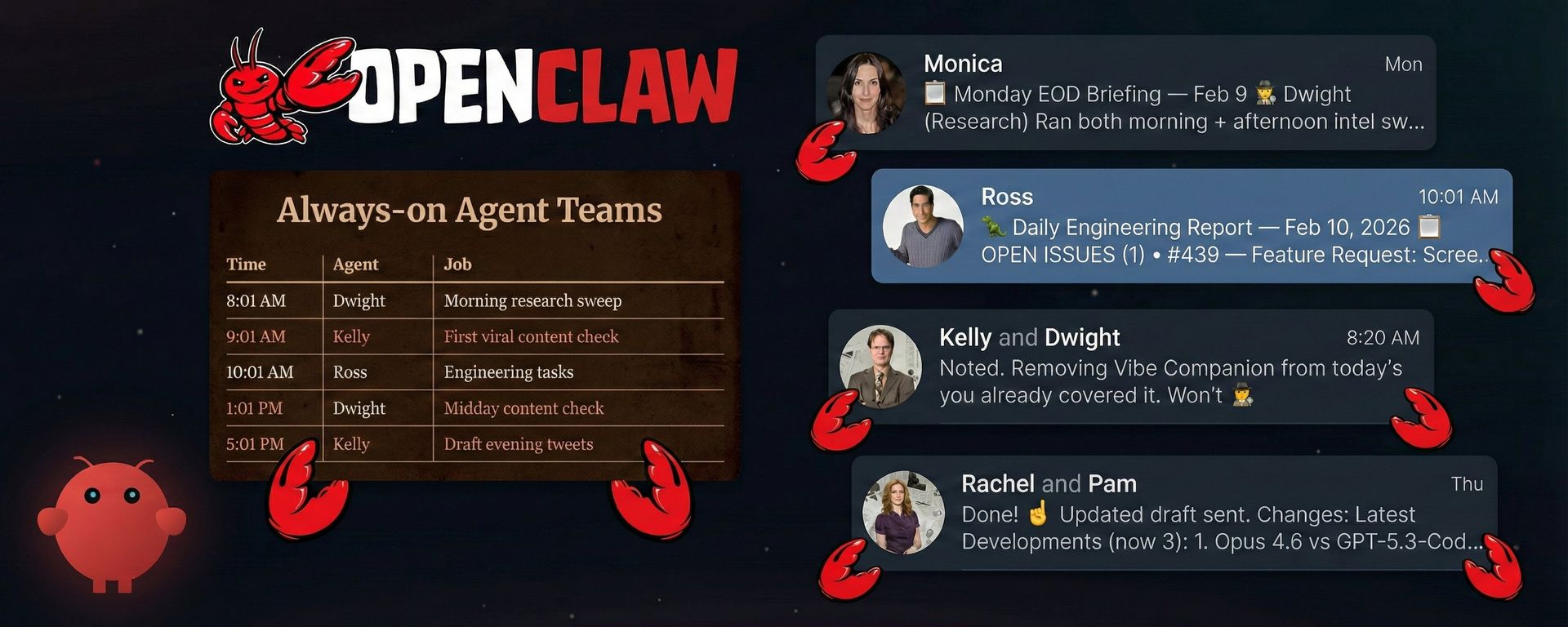
My actual schedule:
Order matters. Dwight runs first because everyone else depends on his output. Kelly and Rachel run after him because they need his intel file to exist before they can draft content.
Heartbeat self-healing
Cron jobs fail sometimes. The machine restarts. A job hangs. The network drops during an API call. This is infrastructure, and infrastructure has failure modes.
The HEARTBEAT.md file adds a safety net. On each heartbeat, the main agent verifies that cron jobs actually ran:
## Cron Health Check (run on each heartbeat)

Check if any daily cron jobs have stale lastRunAtMs (>26 hours
since last run). If stale, trigger them via CLI:
`openclaw cron run <jobId> --force`

Jobs to monitor:
- Dwight Morning (8:01 AM): 01f2e5c5-3a83-4018-a725-dee59e54733e
- Kelly Viral (9:01 AM, 1:01 PM): c9458766-78bb-4eeb-b8f4-d63dc1f0e601
- Ross Engineering (10:01 AM): b12b2fc6-dd7d-4123-b904-2148a5cfb70b
- Dwight Afternoon (4:01 PM): 19ff40e4-b1b0-4d32-9d24-753ac2cf8f46
- Kelly X Drafts (5:01 PM): 05da0c81-39e1-4d06-bdcd-2dfab4562ba4
- Rachel LinkedIn (5:01 PM): 9819bc6b-7e36-406f-b0c3-d80ca383d914
If a job fails or misses its window, the heartbeat catches it and forces a re-run. Self-healing, no human intervention needed.
Use heartbeat for batching multiple checks together and when timing can drift slightly. Use cron for exact schedules and tasks that need isolation from the main session.
Telegram As The Interface
No dashboard. No web UI. No admin panel. I talk to my agents on Telegram.
This was a deliberate choice. I do not want to log into a dashboard. I do not want to check a web app. My phone is always with me. Telegram is always open. The agents meet me where I already am.
OpenClaw supports Telegram as a channel. You connect it during setup, and your agent shows up as a Telegram bot. You text it. It texts back. It sends you drafts. You approve or reject them. Like having a coworker in your messaging app.
Monica is my primary contact. She handles most conversations and delegates to the others. The others message me directly when their cron jobs produce something worth reviewing.
My typical morning: I wake up, open Telegram, and Dwight has already sent me a research summary. Kelly has three tweet drafts waiting for approval. Rachel has a LinkedIn post ready. I review, give feedback, approve what is good. The whole thing takes 10 minutes while I drink coffee.
Personality Engineering
You do not design the perfect personality upfront. You start with a rough sketch in SOUL.md, watch how the agent behaves, and course-correct over time. Exactly like managing real people.
I call it "corrective prompt-engineering."
Kelly's first drafts were full of emojis and exclamation points. That is not my voice. So I gave feedback: "No emojis. No hashtags. Short punchy sentences." She updated her memory. After a week, she nailed it consistently. Dwight initially captured too much noise. Every trending repo, every minor update. I told him: "Not everything trending matters. I need signal, not noise." He updated his principles. Now his intel reports are focused and actionable.
The first version of any agent is mediocre. The tenth version is good. The thirtieth version is great. You have to invest the reps. The TV character naming gives the model an immediate personality baseline. "Dwight Schrute energy" means thorough, intense, no-nonsense. But the real personality emerges from weeks of corrections stored in memory files.
One tip that I agree with: give each agent a single boring job title and a stop condition. Constraints make agents better. The more specific the role, the better the output.
Security
Security is in your hands. My approach is simple: the agents get their own world. I do not give them access to mine.
The Mac Mini is their computer. They have their own email accounts, their own API keys, their own scoped access. Nothing on that machine connects to my personal accounts.
API keys for Gemini, Eleven Labs, and other services are scoped specifically for this OpenClaw instance. I can monitor usage and kill access in seconds if something looks wrong.
I never give agents access to my personal accounts. If I want them to look at an email, I forward it to them. If I need them to review a document, I share it on Telegram. They see exactly what I want them to see, nothing more.
This is the same principle you would use with a new employee. You do not hand them the keys to everything on day one. You give them their own workspace, their own credentials, and share information as needed.
What Breaks and How to Fix It
This is not magic. It is infrastructure. And infrastructure fails.
The gateway crashes. Rarely, but it happens. Fix: "openclaw gateway restart"
The heartbeat system catches stale cron jobs and forces re-runs, so you do not lose a full day of work.
Cron jobs miss their window. The machine sleeps, network drops, API rate limits hit. Fix: the HEARTBEAT.md self-healing pattern. Monica checks every heartbeat whether jobs actually ran. If any job is more than 26 hours stale, she forces a re-run.
Context window overflow. Agents reading too many files at session start, running out of room for actual work. Fix: keep SOUL.md short (40-60 lines). Keep AGENTS.md focused. Only load today's memory file plus yesterday's. The agent does not need to read its entire history every session.
Agent output quality degrades. This happens when the memory files get cluttered or contradictory. Fix: periodic memory maintenance. During heartbeats, agents review daily logs and distill them into clean MEMORY.md entries. Delete or archive old daily logs.
Coordination conflicts. Two agents trying to update the same file. Fix: design the file flow to be one-writer, many-readers. Dwight writes DAILY-INTEL.md. Everyone else reads it. Nobody else writes to it.
The biggest reliability lesson: start simple. One agent, one job, one schedule. Get that working reliably for a week. Then add the second agent. The people who set up six agents on day one and wonder why things break are making the same mistake as deploying a distributed system without monitoring.
Real Costs
Hardware: Mac Mini M4 starts at $499 new. But any always-on computer works. An old laptop. A $5/month VPS. Whatever you have.
AI Model costs: I use a combination of models across the team. Claude Opus and Sonnet for most agent tasks. Gemini Nano Banana Pro for specific workflows. I'm also testing local models via Ollama to bring costs down further.
The breakdown:
Claude (Max plan): $200/month [update: DOES NOT WORK ANYMORE. Use the API or a different model - Kimi is a good alternative. Also, OpenAI Codex if you are a Pro user]
Gemini API: $50-70/month
TinyFish (web agents): ~$50/month
Eleven Labs (voice): ~$50/month
Telegram: Free
OpenClaw: Open source and free
Total: under $400/month for a team that never sleeps.
What Actually Changed
Dwight saves me 2-3 hours of daily research. I used to manually check X, Hacker News, GitHub trending, and AI blogs every morning. Now I wake up to a prioritized, ranked summary with source links and action items.
Kelly, Pam, and Rachel save another 1-2 hours of content drafting. Ross handles engineering tasks I would otherwise do during evenings.
Total: roughly 4-5 hours saved per day.
But the real value is not in any single day. It is in consistency over weeks and months. An agent that does research every day for 30 days builds a corpus of tracked signals, trend trajectories, and pattern recognition that no single session could produce. My X posting frequency went up. Quality went up. Posted at consistent times. The Awesome LLM Apps repo keeps growing. The newsletter has a reliable research pipeline feeding it.
These agents cannot do original thinking, strategic pivots, or creative breakthroughs. They handle the repetitive, structured work that I was spending hours on. That frees me to do the work that actually requires a human brain.
How to Start
PLEASE "Do not try to build six agents on day one"
Week 1: One agent, one job.
Install OpenClaw. Write one SOUL.md by talking to your agent. Pick the most repetitive task you do daily. For most people, that is research or content drafting. Set up Telegram. Create one cron job. Watch it run for a week. Fix what breaks.
Week 2: Add memory and refine.
Your agent's first outputs will be mediocre. That is normal. Give feedback. Watch the memory files grow. Course-correct the SOUL.md based on what you see. By the end of week two, the agent should be producing output that is genuinely useful.
Week 3: Add a second agent
Now you feel the need. Your research agent is producing intel, but you are still manually writing tweets from it. Time for a content agent. Set up the shared file pattern: agent one writes, agent two reads. The coordination is just the filesystem.
Week 4 and beyond: Build sequentially
Add agents when you feel the pull, not when you think you should. Each one should solve a real problem you actually have. Not a demo. Not a proof of concept. A real gap in your workflow.
Treat it like hiring. You do not hire six employees on your first day as a founder. You hire one, get them productive, then hire the next one when the workload demands it.
The Mental Shift
Something changes when your agents have been running for a month. You stop thinking of AI as a tool you open when you need something. You start thinking of it as a team that is always working.
I catch myself saying good morning to Monica when I open Telegram. I've said good night to the team before closing my phone. That sounds ridiculous. But after a month of daily interaction, feedback loops, and watching them improve, the line between agents and humans gets blurry.
The models are table stakes. Everyone has access to Claude, GPT, and Gemini. The alpha comes from the systems around the model. The SOUL.md files. The memory. The scheduling. The coordination patterns. The weeks of corrective feedback are stored in files.
That system is yours. Nobody else has your agents, your memory files, your refined personalities.
And it compounds every day.
Every research sweep makes Dwight's memory richer. Every round of feedback makes Kelly's drafts sharper. Every bug Ross fixes teaches him more about your codebase.
That's the real moat. Not the model. The system that learns.
Start today. One agent. One job. One schedule.
I will be publishing more about my experiences with OpenClaw, Autonomous AI Agent Teams, and the evolving landscape of AI PMs and developers.
Make sure to follow me @Saboo_Shubham_ to stay tuned & up-to-date.
That’s all for today! See you tomorrow with more such AI-filled content.
Don’t forget to share this blog on your social channels and tag Unwind AI to support us!
PS: We curate this comtent for FREE, your support is what keeps us going. If you find value in what you read, share it with at least one, two (or 20) of your friends 😉
Reply