- unwind ai
- Posts
- AI Agents Fail on Bad Context, Not Bad Models
AI Agents Fail on Bad Context, Not Bad Models
Start with Context Engineering before you blame the AI model


Shubham Saboo & Gargi Gupta
October 25, 2025
Your agent fails on a task. The conversation spans 50 turns. The model made decisions that don't make sense.
Your first thought: I need a better model.
Here's what you should think instead: What's actually in my context window?
Think of your LLM as an engineer. A brilliant one. You keep upgrading - GPT-4 then GPT-5, then Claude Sonnet 4.1, then Sonnet 4.5. Each time, you're hiring someone smarter.
But here's what you're handing them:
A desk with 50 browser tabs open
Three different sets of instructions that contradict each other
Printouts from projects completed 40 turns ago
Notes that are 70% irrelevant to the current task
The engineer isn't the problem. The workspace is.
What’s Actually In Your Context Window
Let's look at a typical AI agent at turn 50:
Token Breakdown:
━━━━━━━━━━━━━━━━━━━━━━━━━━━━━━━━━━━━━━━
System prompt:            2,000 tokens
Tool results (47 turns):  85,000 tokens
Conversation history:     40,000 tokens
Retrieved documents:      25,000 tokens
Few-shot examples:        8,000 tokens
━━━━━━━━━━━━━━━━━━━━━━━━━━━━━━━━━━━━━━━
Total:                   160,000 tokens
The problem? About 60% of those 85,000 tool result tokens are completely irrelevant to what the agent is doing right now.
Here's what that looks like:

You're asking a brilliant model to find the signal in 70% noise.
Common Ways Bad Context Kills Agents
1. Signal Drowning
The instruction the agent needs is in the context. But it's buried under noise.
Let’s assume that you are building a database migration agent. Early on, you tell it: "When migrating users, check deleted_at and skip soft-deleted records."
By turn 45, your context is bloated.
“Old schema exploration logs. Connection test results from work that's already done. A posts migration that logged every single batch hundreds of repetitive "Fetched... Inserted..." lines. Debugging output from an issue that was fixed ten turns ago.”
All of this is still sitting in context.
When the agent finally migrates users, it processes 1,000 rows. 127 of them are soft-deleted. It inserts all of them anyway.
Your instruction was there, but it was competing for attention with mountains of stale logs. The field name "deleted_at" appeared everywhere in old documentation.
The model saw it but missed what to do with it.
Clean out completed work. Your context drops from 195,000 tokens to 12,000. Same instruction, but now the model actually pays attention to it.
2. Conflicting Information
Your context accumulates contradictions. The model sees both instructions. It picks one. Sometimes it's the right one. Often it's not.
You're building a customer support agent that handles refund requests. Early in the conversation, you set a policy: "For orders under $50, approve refunds automatically without manager review."
Twenty turns later, you're dealing with fraud concerns. You add: "All refund requests require manager approval until further notice." You're testing stricter controls.
By turn 50, a customer requests a $30 refund. Both instructions are in context. The agent sees "approve refunds under $50 automatically" and also sees "all refunds require manager approval." It picks the second one i.e. requires manager approval. The request gets flagged for review.
But you've already resolved the fraud issue. You wanted the refund to go through automatically. The temporary restriction was meant to be removed. The model saw conflicting rules and picked the more recent one. You call it a model failure. It's a context failure.
When you update policies, remove the old ones. Or be explicit: "Fraud concerns resolved. Resume automatic approval for refunds under $50." Don't leave contradictory instructions in context and expect the model to figure out which one is current.
3. Pattern Pollution
You include few-shot examples to show the model how to use tools. But those examples demonstrate solving a different type of problem.
The model is an excellent mimic. It follows the pattern, not the reasoning. Your examples taught it the wrong thing.
Your code review agent learned from examples showing small PRs: fetch the file, analyze it carefully, provide feedback. Works great for focused changes.
Then someone submits an 87-file refactoring. The entire API is being restructured. Your agent does exactly what it learned - analyzes each file individually. By file 67, context is full and early files get truncated. Now file 72 references something from file 15, which is gone. The agent reports phantom errors (Phantom errors are bugs the agent imagines because it lost or never loaded the right context).
For massive refactors, you need a different approach: check the scope, understand the intent, sample key files, give high-level feedback. Your examples never showed that. The agent applied the wrong pattern because that's all it knew.
Context Quality Degrades Over Time
Here's what happens as your agent runs:
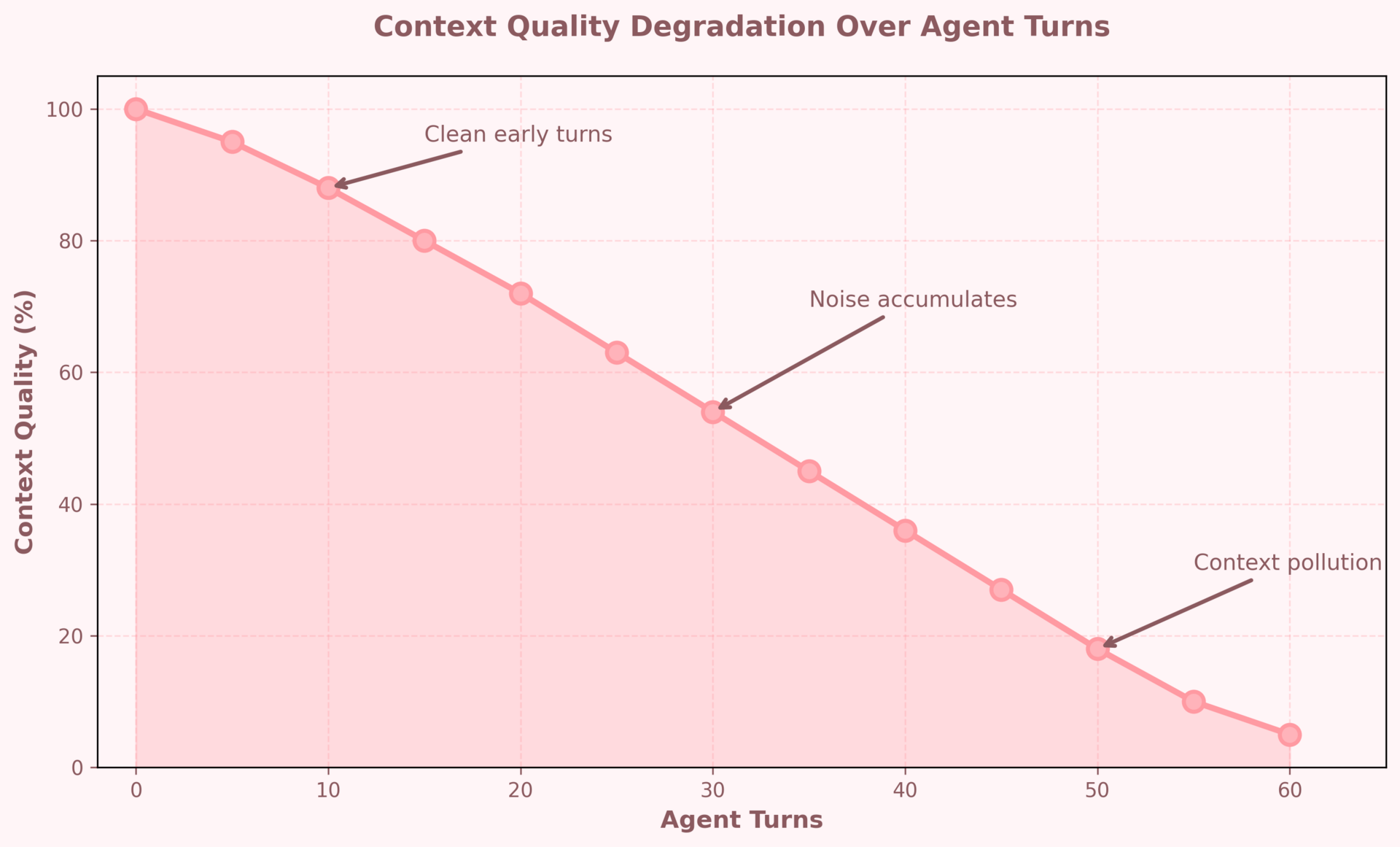
Early turns: clean context, good decisions.
Later turns: polluted context, degraded performance.
This isn't the model getting tired. This is your context window filling with garbage.
The Model Upgrade Trap
Let's do the math:
Upgrading from Claude Sonnet 4 to Claude Opus 4:
→ ~15% improvement in reasoning capability
→ Cost increase: significant
Cleaning your context (removing 70k irrelevant tokens):
→ ~40% improvement in task success rate
→ Cost increase: zero
You're paying for a smarter model to wade through your garbage.
Here's where the disconnect happens:

You're optimizing the wrong layer.
What Good Context Looks Like
The quality of your context is the single biggest factor that decides whether your agent works well at turn 50 or falls apart. Think of it like running a tight ship: everything on deck should serve the task at hand. No stale notes, no noise, no clutter.
Some simple rules to follow:
Only keep tool results relevant to the current subtask
Tool outputs pile up fast. By turn 50, your logs can be bigger than the actual task. Don’t keep every API response forever. Keep the latest outputs that the agent actually needs for the current subtask. Everything else should be either cleared or summarized.
Why: Because when the model sees 10 logs that look similar, it can easily pick the wrong one.One clear source of truth for instructions
Agents break when they see two rules that contradict each other. If you update instructions, remove or clearly mark the old one as outdated.
Why: The model won’t magically know which rule is current. It’ll pick one. Often the wrong one.Keep the story short
A conversation that started clean can become a swamp by turn 40. Summarize past turns into a short, factual digest. Keep only the recent few turns that are still active. You don't need turn-by-turn history from 40 turns ago.
Why: The model doesn’t need to hold on to every step of how you got here. It just needs a clean summary of the key intent, decisions, and open threads.Similarity ≠ Relevance
Vector search gives you similar documents, not always useful ones. Before dumping them into context, ask: does this actually help with the task right now?Why: Loading 5 “kind of similar” docs drowns the one that actually matters.
Few-shot examples should match the problem
Your examples teach the model how to act. If your examples are about small code fixes but the task is a massive refactor, the model will copy the wrong behavior.Why: While good examples guide the model, wrong examples may mislead it.
How This Looks in Practice
Instead of 200k tokens of clutter, you have a lean 30–45k token window.
There’s only one instruction set, not five competing ones.
The agent has just enough history to understand the task, not your entire Slack transcript.
Every doc and example serves a purpose.
Before:
━━━━━━━━━━━━━━━━━━━━━━━━━━━━━
Total tokens:      160,000
Signal ratio:      30%
Task success:      41%
Model:             X
━━━━━━━━━━━━━━━━━━━━━━━━━━━━━

After context cleanup:
━━━━━━━━━━━━━━━━━━━━━━━━━━━━━
Total tokens:      45,000
Signal ratio:      90%
Task success:      73%
Model:             X (same model)
━━━━━━━━━━━━━━━━━━━━━━━━━━━━━
When your context looks like this, the same model that failed yesterday can suddenly perform far better - not because it got smarter, but because you stopped making it read the junk.
Check This Before Upgrading the Model
1. What percentage of my context window is actually relevant to the current task?
→ Open your context. Count tokens. How many are signal? How many are noise?
2. Are there conflicting instructions anywhere in my context?
→ Search for phrases like "always," "never," "make sure to." Do they contradict?
3. Am I keeping tool results I'll never reference again?
→ That database query from turn 8—does the agent need it at turn 50?
4. Do my few-shot examples match the current problem type?
→ If you're doing analysis, don't show examples of data transformation.
5. Have I summarized or cleared old conversation turns?
→ Someone said something 30 turns ago. Is it still relevant?
Fix what you find. Measure again. Then and only then consider if you need a better model.
The next time your agent fails and you think "I need a better model," stop.
Open your context window. Count the signal. Count the noise.
You're probably asking a brilliant engineer to work at a desk buried in printouts from last month's project.
Clean the desk first.
The model you have is likely good enough. Your context isn't.
We share in-depth blogs and tutorials like this 2-3 times a week, to help you stay ahead in the world of AI. If you're serious about leveling up your AI skills and staying ahead of the curve, subscribe now and be the first to access our latest tutorials.
Reply